If you spend eight or more hours a day at a computer, your mouse matters more than you think. For years I used a standard computer mouse and accepted hand fatigue, wrist discomfort, and occasional arm soreness as normal parts of desk work. As an engineer, most of my day is spent at a computer, and the repetitive strain slowly added up. Eventually I upgraded to the Logitech MX Master series, and the difference was immediate. After using the MX Master 2S for more than three years of daily work, it remains one of the best productivity and comfort upgrades I’ve ever purchased. If you’re looking for an ergonomic mouse for engineering, office work, writing, programming, or any profession that requires long hours at a desk, here’s why I continue recommending the Logitech MX Master line.
When you buy through my links, I may earn money from my affiliate partners. Learn more.
If you spend long hours at a computer, I recommend the Logitech MX Master series because it combines a comfortable ergonomic shape with useful controls, wireless connectivity, and scrolling features that make extended computer work easier. I’ve used the MX Master series for years, and its biggest advantage for me has been reducing the hand and wrist fatigue I experienced with a traditional mouse.
Key Takeaways
• An ergonomic mouse can significantly reduce hand and wrist fatigue during long workdays.
• The Logitech MX Master series is one of the most comfortable mice I’ve used after years of daily use.
• Features like thumb controls, wireless connectivity, and adaptive scrolling improve productivity.
• Investing in ergonomic tools may help reduce repetitive strain caused by extended computer use.
• Small workspace upgrades often provide long-term benefits for comfort and focus.
What Makes a Mouse Good for Long Work Hours?
A good mouse for long work hours should prioritize comfort, ergonomic support, easy movement, and features that reduce unnecessary hand and wrist movement. Wireless connectivity can also make a workspace more convenient by eliminating cable friction.
For people who spend most of the day working at a computer, the best choice isn’t necessarily the mouse with the most features. It’s the one that fits comfortably in your hand and makes repetitive computer work feel easier over several hours.
In my experience, the Logitech MX Master stands out because it combines an ergonomic shape with thumb controls, smooth scrolling, wireless connectivity, and a design that works particularly well for extended office and engineering work.
Why an Ergonomic Mouse Matters for Long Work Hours
Most people spend a surprising amount of their lives holding a computer mouse.
Whether you’re an engineer, writer, designer, programmer, student, or office worker, thousands of small hand and wrist movements accumulate throughout the week. The problem is that discomfort rarely appears overnight. Instead, fatigue builds gradually until soreness, stiffness, or irritation begins affecting both comfort and productivity.
For years I assumed occasional hand fatigue was simply part of working at a computer. Like many people, I used whatever mouse came with my computer and never gave it much thought. The result was a cramped hand position, frequent wrist movement, and a level of discomfort I accepted as normal.
The reality is that our workspace tools influence how we feel throughout the day. A poorly designed chair can contribute to back pain. A poorly positioned monitor can strain the neck. Likewise, an uncomfortable mouse can place unnecessary stress on the hand, wrist, and forearm.
That doesn’t mean an ergonomic mouse is a miracle cure for every workspace issue. However, finding equipment that better fits your body can make long hours at a desk far more comfortable and sustainable.
After switching to the Logitech MX Master series, I immediately noticed less fatigue and greater comfort during long workdays. It was one of those rare upgrades where I wished I had made the change years earlier.
Why I Switched Away from a Traditional Mouse
As an engineer often tied to a desk for 8-10 hours a day, I really don’t know where I’d be without this mouse.
I used to have the traditional, small mouse that would leave my wrist and hand feeling sore and fatigued.
My fingers would get tired laying prone and I’d often have to shake out my arm throughout the day.
When I upgraded to the Logitech MX Master 2S Wireless Mouse, all my fatigue went away. The mouse is ergonomic and keeps my wrist and fingers in a position that feels relaxing and smooth all day.
I’ve even recommended this computer mouse to many other engineers who have also found it ideal for long stints at the desk.
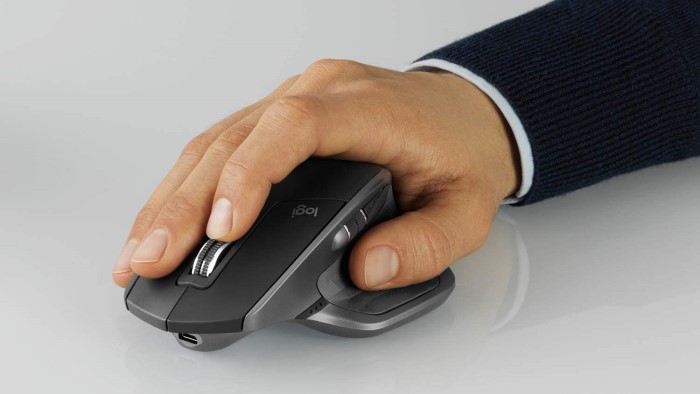
Logitech MX Master 2S Review After 3 Years of Daily Use
If you’ve always used a standard mouse, don’t let all the extra features scare you.
The basic functions are there, but vastly improved with endless scrolling and friction scrolling with the tap of a button. You can even use your thumb to move forward or backward within applications or from one application to another, and let’s not forget the joy of a wireless connection!
My MX Master even works on glass tabletop surfaces with perfect accuracy.
Pricing and availability change frequently, so check the current listing before purchasing. At a reasonable cost and thousands of great reviews, you really can’t go wrong giving this mouse a try.
I’ve had my MX Master 2S for 3 years and it’s still working just as great as the day I opened the box.
It’s definitely been one of my favorite tech upgrades, perhaps second only to my Apple AirPods Pro that I shout about from the rooftops.
My Favorite Features of the MX Master
Logitech has released a newer version of their aforementioned ergonomic powerhouse called the Logitech MX Master 3 Wireless Mouse, that has some additional features and a slightly more rotated design. (Editor’s Note 2026: I upgraded to the MX Master 3 after my 2S got damaged from a high drop. I love this one even more!)
It’s got super quiet scrolling, a quick 1-minute charge that lasts 3 hours, and an overall battery life of 70 days.
Yeah…you read that right. Once you power this computer mouse up you’re golden for over 2 months! No more computer mouse failure when you’re showing off that snazzy Powerpoint slide deck.
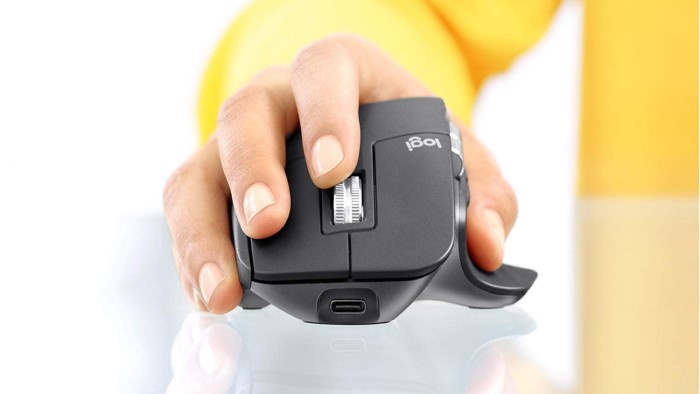
The MX Master 3 has a slightly higher price tag but boasts tens of thousands of strong reviews.
MX Master 2S vs. MX Master 3: Which Should You Buy?
I originally used the Logitech MX Master 2S for more than three years of daily computer work, and it became one of my favorite productivity tools. When the 2S was damaged after a high drop, I upgraded to the MX Master 3.
The transition was easy because the basic experience is familiar, but I prefer the MX Master 3. Logitech refined the design while keeping the features that made the MX Master 2S so useful for long hours at a computer.
The MX Master 3 has a slightly more rotated design, quieter scrolling, and a long-lasting battery, while retaining the ergonomic shape and productivity features I appreciated most about the 2S. It also retains the features I appreciated most about the 2S, including the comfortable ergonomic shape, thumb controls, wireless connectivity, and smooth scrolling.
If you already own an MX Master 2S and it is working well, I don’t think you need to replace it simply because a newer model exists. Mine served me well for years. But if you’re buying an MX Master for the first time, I would choose the MX Master 3 based on my experience with both models.
Is the MX Master a Good Mouse for Wrist Pain and Carpal Tunnel?
Most everyone has heard of Carpal Tunnel Syndrome but few people know what causes it or what induces carpal tunnel flare ups.
The Mayoclinic provides a detailed analysis of carpal tunnel syndrome that can be summarized this way:
Carpal tunnel syndrome occurs when the median nerve in our wrist gets compressed and remains compressed or in an irritated position.
An ergonomic mouse may make computer work more comfortable for people who experience wrist or hand discomfort, but it isn’t a treatment for carpal tunnel syndrome. For me, the more comfortable shape of the MX Master substantially reduced the fatigue I experienced during long workdays. If you have persistent wrist pain, numbness, tingling, or other symptoms, it’s worth discussing them with a healthcare professional rather than relying on a mouse alone.
For less than $100, you can upgrade your health and productivity just like I did with a computer mouse that will make your long days at your desk all the more enjoyable.
Why I Recommend the Logitech MX Master for Long Work Hours
After years of using the MX Master series for long hours at a computer, these are the features that have made the biggest difference for me:
- Ergonomic shape. The larger, more supportive design feels much more natural in my hand than the small traditional mouse I used previously.
- Thumb controls. Having additional controls within easy reach of my thumb makes navigating applications and documents more convenient.
- Smooth scrolling. The scrolling options make it easy to move through long documents, web pages, and other content without constantly adjusting my hand.
- Wireless connectivity. Not having a cable attached to my mouse keeps my workspace cleaner and makes the setup more convenient.
- Long battery life. I rarely have to think about charging it, which is exactly what I want from a tool I use every day.
- Comfort during long sessions. For me, the biggest benefit has been reduced hand and wrist fatigue compared with the traditional mouse I used before.
- Useful for productivity. The MX Master works particularly well for the kind of computer work I do as an engineer, including documents, presentations, browsing, and other tasks that require long hours at a desk.
- Designed for productivity rather than gaming. If your primary goal is comfortable, efficient computer work rather than gaming performance, the MX Master is where I think this mouse really shines.
For me, the combination of comfort and useful productivity features is what separates the MX Master from a basic computer mouse. I spend a significant portion of my life at a computer, so a tool that makes those hours more comfortable is worth the investment.
Other Workspace Upgrades Worth Considering
While an ergonomic mouse made the biggest difference for me, it’s only one part of a comfortable and productive workspace.
Over the years I’ve found that small improvements often compound into a significantly better work experience.
A few upgrades worth considering include:
A quality keyboard. Just as an ergonomic mouse improves comfort, a well-designed keyboard like the Logitech MX Wireless Keyboard can reduce strain during long periods of typing.
Proper monitor placement. Positioning your monitor at the correct height can reduce neck and shoulder tension throughout the day.
Noise-canceling headphones / ear buds. Beats Studio Buds have become one of my favorite productivity tools for blocking distractions and improving focus during deep work, long walks, or workout sessions.
A standing desk or adjustable workstation. Alternating between sitting and standing can help reduce the physical fatigue that comes from remaining in one position all day.
Good lighting. Eye strain often has less to do with screens and more to do with poor lighting conditions around the workspace.
Ergonomic seating. Modern life means extended sitting for 8-10 hours a day for most people working in office environments. I once sat on a box for a week after moving my family cross-country and I can still remember the relief I felt when my new office desk chair arrived. Do yourself, and your back, and your shoulders, and your legs, and your neck a favor…invest in a quality chair.
What I’ve learned is that productivity isn’t only about better habits and better systems. Sometimes it’s about removing physical friction. Small improvements in comfort can make it easier to focus, work longer without fatigue, and maintain energy throughout the day.
Many of the tools I use regularly can be found on my Resources page, where I’ve collected products that have genuinely improved my work, productivity, and daily life.
Final Thoughts
After thousands of hours using the MX Master series, it remains one of the easiest technology recommendations I make.
The MX Master 3 is the model I would choose today, but my experience with the 2S is a big part of why I trust the MX Master line.
Most productivity advice focuses on apps, systems, and workflows. Those things matter, but physical comfort matters too. When your hands, wrists, and shoulders feel better, it’s easier to stay focused and productive throughout the day.
The MX Master won’t magically make you more efficient, but it can make long hours at a computer significantly more comfortable.
For me, it has been one of the best workspace upgrades I’ve ever purchased.
And after more than three years of daily use, I’d buy it again without hesitation.
